Getting Started¤
This page shows how to use the BBOB functions via the registries, pick deterministic or randomized problem instances, and work with plotting helpers.
- Prerequisite: install the package (see Installation).
- API reference: see API Reference.
Quick Usage¤
import jax
import jax.numpy as jnp
import jax.random as jr
from bbob_jax import registry

# Choose a function by name in the registry, and create the function by calling it with the dimenionality (`ndim`) and a random key (`key)`:
key = jr.key(0)
fn, f_opt = registry["sphere"](ndim=2, key=key)

x = jnp.zeros((2,))  # 2D input
val = fn(x)
print(float(val))
616.7059936523438
Deterministic vs. Randomized¤
Two registries are available:
registry: randomized instance; creates withregistory[<fn_name>](ndim=<dim>, key=<key>).registry_original: deterministic (no shift/rotation/offset); call asfn(x).
Both returning registries produce function objects that can be called with just the decision vector x.
from bbob_jax import registry, registry_original
import jax.numpy as jnp
import jax.random as jr

x = jnp.zeros((5,))

# Randomized instance (shift, rotations, and fopt applied)
fn_rand, global_min_rand = registry["rastrigin"](ndim=5, key=jr.key(0))
val_rand = fn_rand(x)

print(f"Objective function value at {x}: {val_rand}")

# Deterministic/original (no shift/rotation/fopt)

fn_det, global_min_det = registry_original["rastrigin"](ndim=5)
val_det = fn_det(x)

print(f"Objective function value at {x}: {val_det}")
Objective function value at [0. 0. 0. 0. 0.]: 2267.5234375
Objective function value at [0. 0. 0. 0. 0.]: 0.0
Evaluate Many Points (jit/vmap)¤
You can JIT-compile functions and batch-evaluate points with vmap:
import jax
import jax.numpy as jnp
import jax.random as jr
from bbob_jax import registry

fn_rosen, global_min = registry["rosenbrock"](ndim=2, key=jr.key(0))

# Same randomized instance across all points: pass the same key
X = jnp.stack(
    [
        jnp.array([1.0, 1.0]),
        jnp.array([0.5, -0.5]),
        jnp.array([2.0, 2.0]),
    ]
)

batched = jax.vmap(fn_rosen)
compiled = jax.jit(batched)
vals = compiled(X)
print(vals)
[2202.23 834.8828 3598.2253]
If you want a different instance per evaluation (usually not desired within a single batch), you could pass different keys per row.
List Available Functions¤
from bbob_jax import registry

print(sorted(registry.keys()))
['attractive_sector', 'bent_cigar', 'discuss', 'ellipsoid', 'ellipsoid_seperable', 'gallagher_101_peaks', 'gallagher_21_peaks', 'griewank_rosenbrock_f8f2', 'katsuura', 'linear_slope', 'lunacek_bi_rastrigin', 'rastrigin', 'rastrigin_seperable', 'rosenbrock', 'rosenbrock_rotated', 'schaffer_f7_condition_10', 'schaffer_f7_condition_1000', 'schwefel_xsinx', 'sharp_ridge', 'skew_rastrigin_bueche', 'sphere', 'step_ellipsoid', 'sum_of_different_powers', 'weierstrass']
Filter by Function Characteristics¤
function_characteristics provides simple tags (e.g., separable, unimodal).
from bbob_jax import function_characteristics

separable = [
    name
    for name, tags in function_characteristics.items()
    if tags.get("separable")
]
print(separable)
['sphere', 'ellipsoid_seperable', 'rastrigin_seperable', 'skew_rastrigin_bueche', 'linear_slope']
Plotting Utilities (optional)¤
Install plotting extras and use the helpers to visualize a function:
pip install "bbob-jax[plot]"
import jax.random as jr
import matplotlib.pyplot as plt
from bbob_jax import registry
from bbob_jax.plotting import plot_2d

key = jr.key(0)
# fn_sphere, _ = registry["sphere"](ndim=2, key=key)

fig, ax = plt.subplots(figsize=(5, 4))
plot_2d(
    registry["sphere"],
    bounds=(-5.0, 5.0),
    key=key,
    px=200,
    ax=ax,
    log_norm=False,
)
ax.set_title("Sphere (randomized instance)")
plt.show()
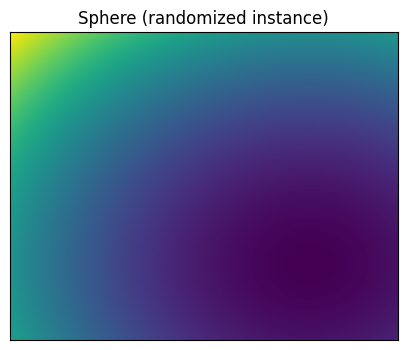
See the plotting API in API Reference under "Plotting Utilities".
Advanced: Under-the-hood Signatures¤
Internally, the raw functions are defined as fn(x, x_opt, R, Q) and the registries handle building these parameters for you (plus adding an offset fopt to the randomized variant). Prefer using registry/registry_original from the public API rather than calling internal functions directly.